Is a MacBook Cheaper in Japan? 2026 Japan vs US Prices
Thinking about buying a MacBook in Japan during your trip? With the weak yen, Japan has been a bargain favorite for visitors. But Apple raised Mac prices in Japan on June 25, 2026 — so is a MacBook still cheaper here, and how does tax-free shopping actually work for tourists?
I live in Japan and bought a 15-inch M5 MacBook Air here in June 2026, so I follow local pricing closely. The Apple prices below were rechecked on Apple’s Japan and US online stores on September 29, 2026. The tax-free procedures were checked against Japan Customs and Japan Tourism Agency guidance on the same date.
Quick answer
A MacBook is not automatically cheaper in Japan. The answer depends on your home-country price, the exchange rate and whether your purchase qualifies for tax-free treatment. Below, I compare the same MacBook Air configurations in Japan and the US, explain the tax assumptions, and share what I paid for my own refurbished 15-inch model.
Compare the same configuration — M5, 16GB memory, 512GB storage — and at an assumed exchange rate of ¥157.9 per US$1, the 13-inch is roughly level with the US price before sales tax, while the 15-inch is a little more expensive in Japan, even when Japanese consumption tax is excluded.
At that assumed rate, both models cost more at Japan’s tax-included prices than at the listed US prices before sales tax. Compare your actual checkout totals before deciding.
So: still worth checking, no longer worth planning a shopping trip around. Run your own country’s Apple price first.
MacBook Air prices: Japan vs the US (checked September 29, 2026)
Apple only sells the M5 MacBook Air with 512GB storage and 16GB memory as the base configuration — there is no 256GB model in this generation. That matters, because a lot of price comparisons online are still quoting 256GB numbers from the previous generation.
| Configuration | Japan (Apple Japan, tax included) | US (Apple US, before sales tax) |
|---|---|---|
| MacBook Air 13” (M5, 10-core CPU / 8-core GPU, 16GB, 512GB) | ¥224,800 | $1,299 |
| MacBook Air 15” (M5, 10-core CPU / 10-core GPU, 16GB, 512GB) | ¥264,800 | $1,499 |
Both are Apple’s standard retail prices. Neither is an education price — Apple’s education store is separate, and mixing the two is the single easiest way to get this comparison wrong.
About that “tax-free” number. Apple Japan’s prices above include Japan’s 10% consumption tax. Excluding it (tax-included price ÷ 1.10) gives roughly ¥204,400 (13”) and ¥240,700 (15”).
Treat those as a theoretical pre-tax equivalent, not a price tag. They are not prices you can walk in and pay at an Apple Store, and a tax-free electronics retailer sets its own shelf price, which may be higher or lower than Apple’s. Use them to compare, not to budget.
Where the break-even sits
Exchange rates move, so rather than freezing one number into a conclusion, here is the rate at which Japan stops being cheaper:
The US prices here are before applicable sales tax. The break-even rates exclude US sales tax, card fees and any taxes due when you bring the Mac home. Compare your final checkout totals for the same configuration. The tax-excluded Japanese figures are calculations, not confirmed offers from a retailer.
| Model | If Japanese consumption tax is excluded | If you pay tax-included |
|---|---|---|
| 13” | ¥157.3 per US$1 | ¥173.1 per US$1 |
| 15” | ¥160.6 per US$1 | ¥176.7 per US$1 |
Weaker yen than that, and Japan wins. Stronger, and it doesn’t.
For a worked example, assume ¥157.9 per US$1. Use your card or payment provider’s actual exchange rate when making your own comparison. At that assumed rate:
- 13”: about $1,294 with the tax stripped out, against $1,299 in the US. A rounding error.
- 15”: about $1,525 with the tax stripped out, against $1,499 in the US. Japan is roughly $25 more.
- Paying tax-included, Japan runs about $125 (13”) and $178 (15”) above the US price.
Both Apple Japan and Apple US have moved Mac prices during 2026, which is exactly why the numbers above carry a date. Anything you read without one is probably stale.
How tax-free shopping works for tourists
First, the part that hasn’t changed. To buy tax-free in Japan you need to be a non-resident — in practice, a foreign visitor on a short-stay (“temporary visitor”) status. Bring your passport. Japanese nationals living abroad can qualify too, but under a separate set of conditions. There is a minimum-spend threshold, though a MacBook clears it comfortably either way.
What has changed is when you get the money.
If you buy before November 1, 2026
For purchases made before November 1, 2026, eligible visitors can buy qualifying goods at a licensed Japan Tax-Free Shop and pay the tax-excluded price at the register. You still need to present your passport to Customs when leaving Japan, and Customs may inspect the goods. Check the official departure instructions from Japan Customs before your flight.
If you buy on or after November 1, 2026
Japan switches to a refund method. According to Japan Tourism Agency guidance, it works like this:
- The shop sells you the item at the full tax-included price.
- When you leave Japan, customs at the airport or seaport confirms that you are actually taking the goods out.
- That confirmation is passed back, and the shop — or the refund service provider it uses — refunds you the consumption tax.
The distinction in step 3 matters and is widely misreported. The airport is not the refund counter. Customs verifies the export; the shop handles the money. Refund methods vary by shop and can include bank transfer, credit card, an app, or cash at the departure port after customs has confirmed. Ask the shop at the time of purchase — that’s also when you register how you want to be paid.
Five things that catch people out under the new system
Straight from the Japan Tourism Agency’s traveler guidance, and all five are relevant if the thing you’re carrying is a laptop:
- Do the customs check before you check your bag. The tax-free terminals sit in the international departure lobby, before baggage check-in. Once a suitcase is checked, you cannot get it back to show the contents.
- The check is per receipt, not per item. If even one item on a purchase transaction isn’t in your possession, nothing on that receipt qualifies. Don’t gift away the accessories you bought on the same slip.
- You have to carry it out yourself. The quantity you can buy tax-free is limited to what you can personally present to customs on departure.
- Separate shipment is gone. Mailing your own tax-free goods home was abolished on March 31, 2025. Some shops offer their own overseas shipping — ask them directly, and don’t assume it keeps the exemption.
- 90 days, and register your refund method. You need to clear customs at departure within 90 days of purchase, and the refund route is set up with the shop when you buy.
Also worth knowing: if you don’t actually export goods that passed the customs check, the tax is collected back from you and penalties apply.
Where to buy tax-free (and where you can’t)
Big electronics retailers are the usual answer for instant tax-free service and English support: Bic Camera, Yodobashi Camera, Yamada Denki and similar chains. Look for the “Japan. Tax-free Shop” logo.
Apple’s own retail stores in Japan are widely reported not to offer the tourist tax-free scheme. I could not find a statement on Apple’s own site confirming that either way as of August 10, 2026, so I’m not going to state it as fact — but I would not walk into an Apple Store assuming you’ll get 10% off. Ask before you buy, and if the tax matters to your budget, go to a licensed tax-free retailer instead.
So — should you actually buy one in Japan?
- Worth considering if: the tax-free price plus today’s exchange rate genuinely beats your home Apple price, or your home country has high VAT or import duties. Run the arithmetic with the break-even table above rather than a general impression.
- Probably not if: you’re looking at the 15-inch. At the assumed rate of ¥157.9 per US$1 used above, it costs more here than the listed US price before sales tax, even with Japanese consumption tax excluded. US sales tax and your actual exchange rate can change that comparison.
- Still attractive: accessories, iPads and AirPods, where the absolute yen amounts are smaller and the tax-free step is less of a production.
Practical tips before you buy
- Keyboard layout (important): MacBooks sold in Japan usually have a Japanese (JIS) keyboard with kana. If you want a US layout, order a custom US-keyboard model from Apple Japan online — but note that’s Apple’s own channel, so the tax-free question above applies. In-store retailers stock JIS.
- Charger and voltage: Apple’s USB-C chargers are 100–240V, so they work worldwide — you just need a plug adapter for home.
- Warranty: Apple’s limited warranty for Macs is generally honored internationally, but AppleCare+ options can vary by country.
- macOS language: you can switch macOS to English during setup wherever you buy it.
- Check the configuration, not the headline: with 512GB and 16GB as the floor this generation, make sure you’re comparing the same spec on both sides.
- Look at refurbished: Apple Japan runs its own Certified Refurbished store, and the discount there is real (see below). Stock is unpredictable, though, and it is Apple’s own channel — so the same tax-free caveat applies.
A note from me (a Japan resident)
I’m not writing this as a tourist. On June 26, 2026 I bought a 15-inch MacBook Air (M5, 10-core CPU, 10-core GPU, 16GB memory, 512GB storage, Sky Blue) from the Apple Store online in Japan — an Apple Certified Refurbished unit — and paid ¥223,800. It arrived on June 30.
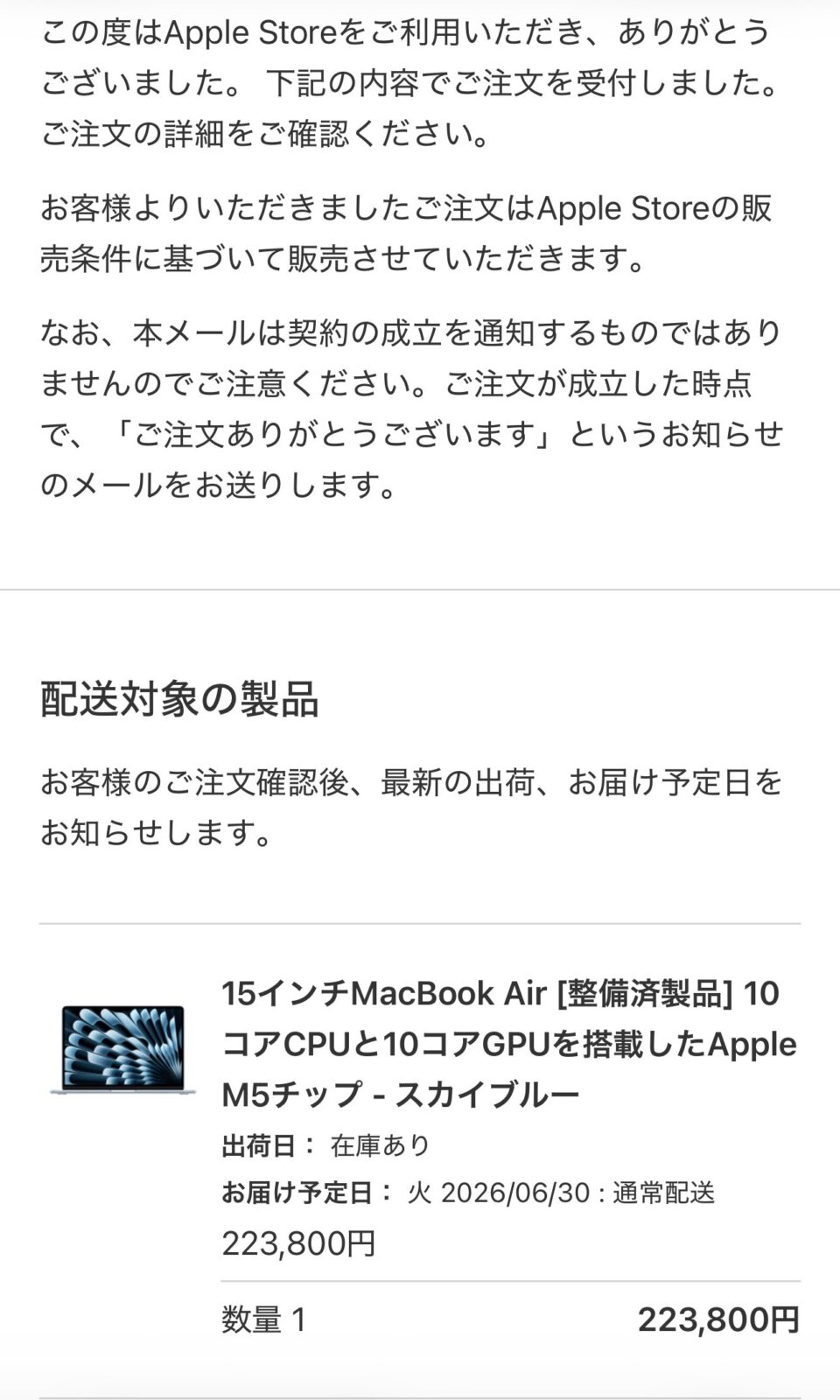
That is the same configuration as the new 15-inch in the table above, for ¥41,000 less — about 15% off. At the same ¥157.9 rate it works out to roughly $1,417, which is under the $1,499 Apple charges for a new 15-inch in the US. I’ve still kept it out of the comparison table on purpose: refurbished is not new, and refurbished stock comes and goes, so it isn’t something you can plan a trip around. It is worth checking on the day, though.
The other thing to be straight about: as a resident I don’t get the tourist tax-free deal, and I have never been through the refund procedure myself. Everything in the tax-free sections above comes from Japan Tourism Agency guidance, not from my own experience at a customs counter. I’ve tried to mark that clearly rather than blur it.
Bottom line
A MacBook is not automatically cheaper in Japan. At the assumed rate of ¥157.9 per US$1, with Japanese consumption tax excluded, the same M5 / 16GB / 512GB 13-inch is roughly level with the listed US price before sales tax, and the 15-inch is a little more expensive. With Japanese consumption tax included, both cost more than those pre-tax US prices. The better deal depends on your home-country checkout total, your actual exchange rate and whether your purchase qualifies for tax-free treatment.
If you’re buying anyway — because you want it now, or you like the idea of a Japanese keyboard — check the exact configuration, don’t assume an Apple Store will handle tourist tax-free, and for purchases made on or after November 1, 2026, remember that Customs confirms the export and the shop or its refund service provider pays the refund.
Apple prices checked on Apple’s US and Japan online stores on September 29, 2026. Tax-free procedures checked against Japan Customs and Japan Tourism Agency guidance on September 29, 2026. Exchange rates and Apple pricing both change — check current figures before purchasing. Informational only, not financial advice.